


BC Trade-In Program Guide | Znoox Furniture


How Does the Znoox BC Trade-In Program Work?
Replacing old furniture should feel exciting. However, the old sofa, sectional, or bed frame often creates a problem. Selling it online can take weeks. Arranging removal can also become stressful.
The Znoox BC Trade-In Program offers a simpler path. Customers can submit their current furniture online, receive an evaluation, and earn store credit toward new Znoox furniture.
The updated application is no longer one long form. It now guides customers through four clear stages. These stages cover personal information, furniture details, furniture photos, and product selection.
Customers can choose a Znoox product during the application. They can also decide later. After submission, they receive a request number and can follow every update through their Znoox account.
This guide explains the full process, from the first application step to store credit, checkout, delivery, and pickup. Customers who want to begin immediately can visit the Znoox BC Trade-In Program application page.
Why the BC Trade-In Program Makes Furniture Upgrades Easier
Many homeowners keep furniture longer than planned. Their existing sofa may still have value, yet selling it privately feels like a second job.
Online selling requires photos, listings, messages, price negotiations, and pickup arrangements. Even after all that work, buyers may cancel without warning. Humanity built the internet, then used it to ask, “Is this still available?” before disappearing forever.
The BC Trade-In Program replaces that scattered process with one connected system. Customers submit their furniture directly to Znoox. The team evaluates the request and provides an offer when the item qualifies.
If the offer is accepted, the value becomes store credit. Customers can apply that balance toward a new Znoox purchase. Znoox then helps coordinate delivery and pickup.
The program can save time, reduce furniture waste, and make a new purchase more affordable. The Furniture Trade-In Program Benefits Guide explains these advantages in more detail.
How to Start the Trade-In Program on the Znoox Website
The application begins on the BC Trade-In Program page. Customers scroll to the section titled Apply for the BC Trade-In Program.
The first screen provides two choices. The Start Your Trade-In button opens the application. The How It Works button opens a short explanation of the process.
Customers do not need to log into an existing account before starting. They can begin by entering their personal information.
If the customer does not already have a Znoox account, the system can create one after the request is submitted. The confirmation page then instructs the customer to check their inbox for a secure password link.
This new approach removes the old login wall. It allows customers to begin the application first and access their account afterward.

The Four-Step BC Trade-In Application
Personal Information → Furniture Details → Furniture Photos → Choose Znoox Items
A progress bar appears above the application. It shows the customer’s current step and the remaining stages.
Customers can use the Continue and Back buttons to move through the application. Their information stays organized by topic, which makes the process easier to review.
This structure also helps prevent information from being missed. Instead of facing one enormous form that appears to have been designed as a test of human endurance, customers complete one focused stage at a time.
Enter Your Personal Information
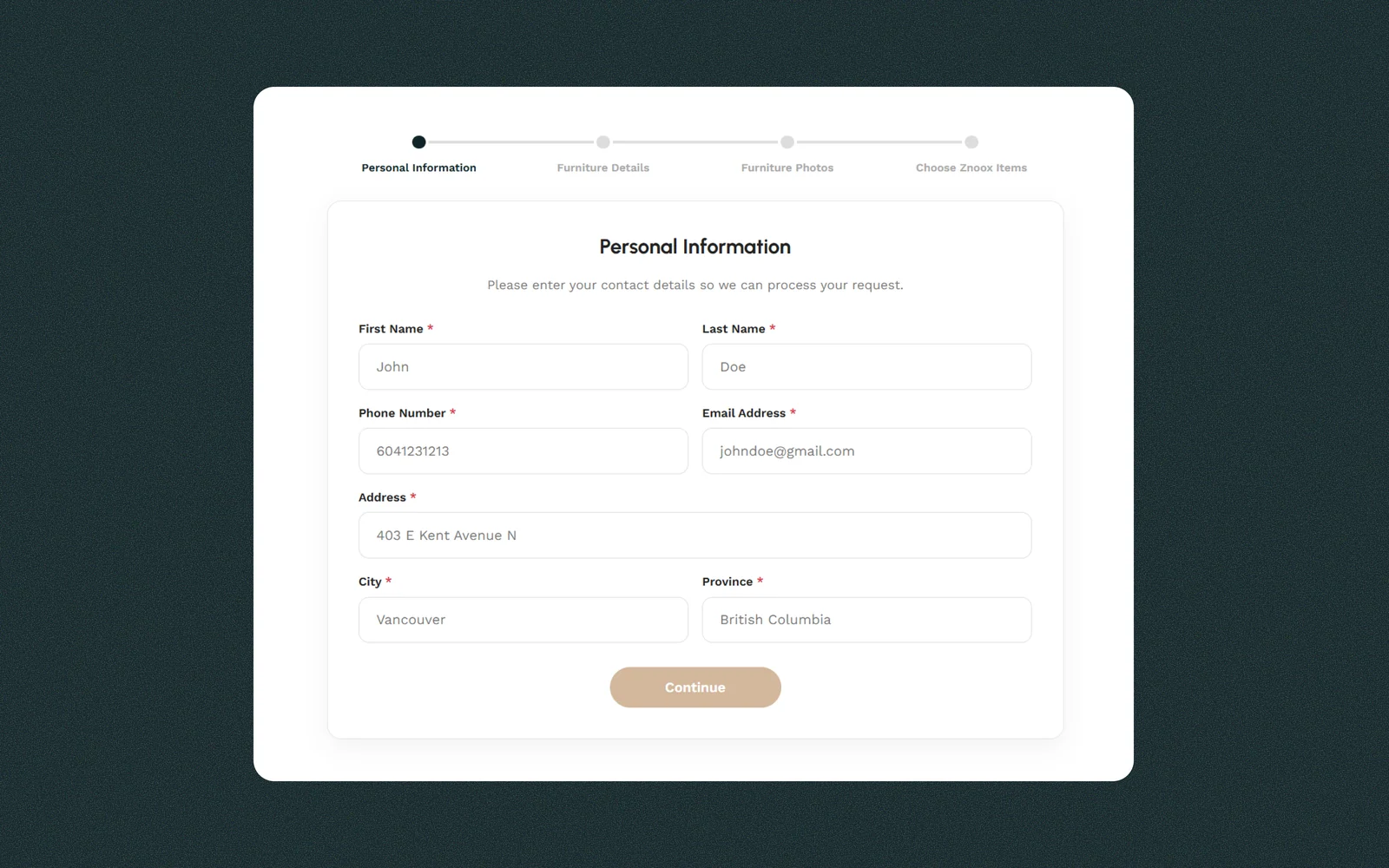
The first application stage collects the customer’s contact and location information.
Customers enter their first name, last name, phone number, and email address. They also provide their street address, city, and province.
Accurate contact details matter because Znoox uses this information to process the request and communicate with the customer. The address also helps the team understand the likely pickup area.
Customers should use an email address they can access. If the application creates a new account, the password setup link will be sent to that address.
After reviewing the information, the customer selects Continue to reach the furniture details stage.
Describe the Furniture You Want to Trade In
The second stage collects information about the furniture.
Customers begin by selecting the furniture type and condition. They then enter the year of purchase and original purchase price, when known.
The application also includes a field for the brand and model. This information can help the Znoox team identify the item and understand its materials, age, and original design.
The Additional Details field gives customers room to explain the furniture more clearly. They can mention worn cushions, scratches, loose legs, pet damage, stains, repairs, or other concerns.
Customers should describe the condition honestly. A complete description supports a more accurate review and reduces the chance of surprises later.
The original price provides context, but it does not guarantee a specific trade-in value. The final evaluation also considers condition, age, safety, demand, and practical reuse potential.
For a deeper explanation of this stage, read how furniture evaluations work. The guide explains how photos, wear, structure, age, and market demand may affect the decision.

Upload Clear Furniture Photos
The third stage asks customers to upload clear photographs of the item.
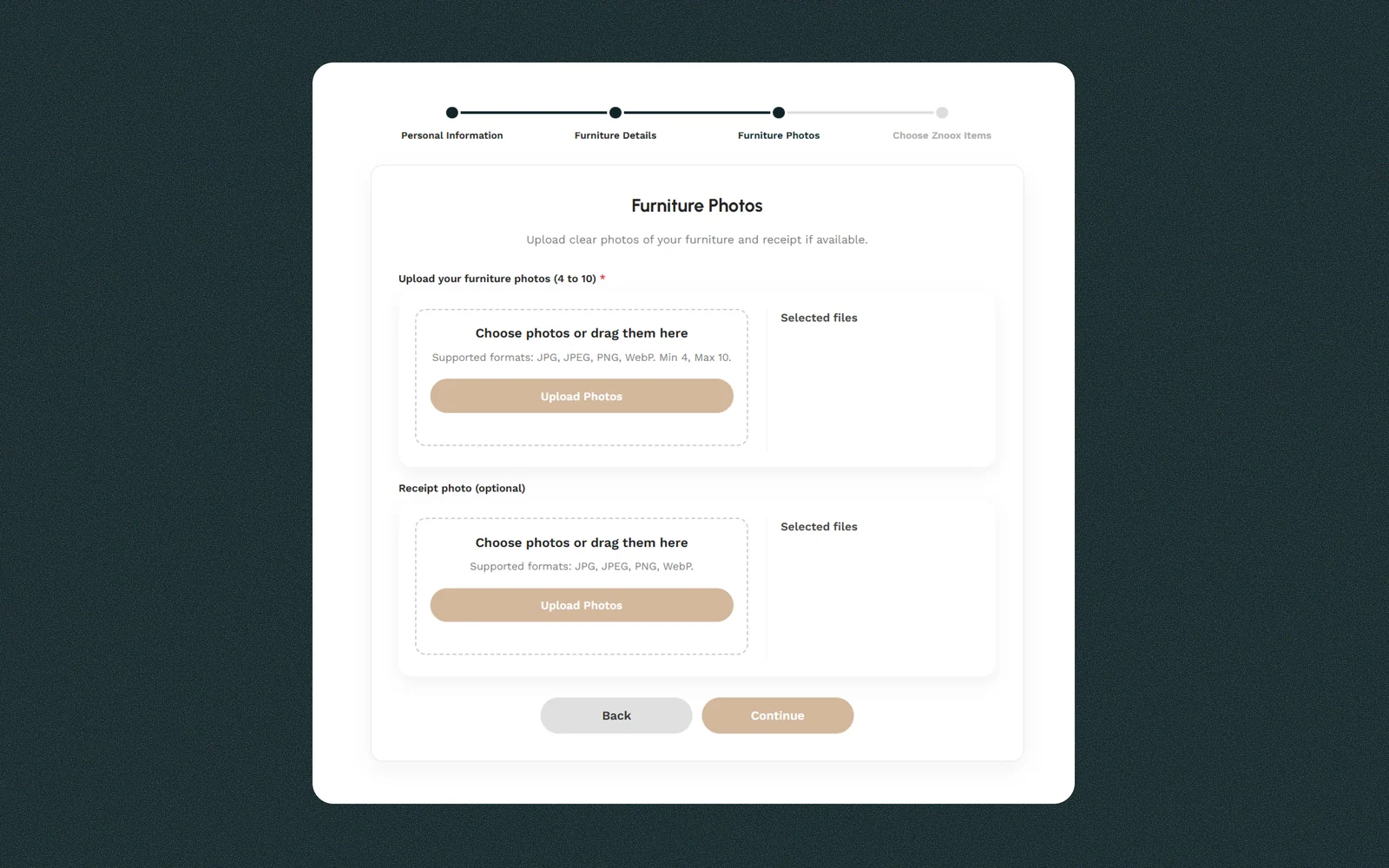
The application requires between four and ten furniture photos. Supported formats include JPG, JPEG, PNG, and WebP.
Customers can select files from their device or drag them into the upload area. The selected files appear beside the uploader.
Photos should show the full item from several angles. Customers should include front, side, rear, and close-up views. Any visible damage should also appear clearly.
For a sectional sofa, the photos should show each section and the connection points. For a bed frame, the images should show the headboard, side rails, slats, and visible wear.
Good lighting helps the team review fabric, leather, seams, cushions, legs, and structural parts. Filters, dark rooms, and strategically placed blankets are less useful. The evaluation team needs the furniture, not its carefully managed social-media persona.
Customers may also upload a photo of a receipt. The receipt is optional, but it can help confirm the original retailer, model, price, or purchase date.
Choose a Znoox Product or Decide Later
The final application stage allows the customer to choose a Znoox product.
The available products for Trade-In are organized into three categories:
- Sofas
- Sectionals
- Beds
Customers can switch between categories and select the product they may purchase with their future trade-in credit.
Someone replacing a couch can browse Znoox sofas. Customers needing more seating can explore Znoox sectional sofas. Bedroom upgrades can begin with the Znoox beds collection.
Selecting a product during the application does not complete the purchase. It records the customer’s current product preference within the request.
Customers who are not ready to decide can select I’ll choose a product later. This option allows them to submit the trade-in request without committing to a specific Znoox item.
A product or the choose-later option must be selected before the request can be submitted.

Submit Your BC Trade-In Request
After completing all four stages, the customer selects Submit Trade-In Request.
The system then displays a confirmation page. This page confirms that the request was sent successfully and provides a unique request number.
Customers should keep this number for their records. It can help identify the request during future communication with the Znoox team.
The confirmation page also includes two actions. View Your Request opens the submitted request, while Browse Products returns the customer to the Znoox collection.
If the system created a new account, the page instructs the customer to check their inbox. The email contains a secure link for setting the account password.
This account gives customers access to request tracking, submitted photos, selected products, messages, offers, and store-credit information.

What Happens After Submitting the Request?
After submission, the request enters the review stage.
Customers can open the Your Trade-In Requests section through their Znoox account. They can then select an individual request to view its details.
The request page displays the furniture type, condition, brand, model, year of purchase, and original price. It also shows the additional notes supplied during the application.
If a Znoox product was selected, that product appears beside the furniture details. The uploaded furniture photos appear farther down the page.
The request status appears near the top. A new application normally begins with a status such as Pending Review.
Customers can also send a message to the Znoox team from the request page. This messaging area can be used for questions, clarifications, or pickup and delivery details.
Keeping messages inside the request helps both sides follow the conversation. It also prevents important details from becoming lost inside an email inbox, where useful information traditionally goes to die.

How the Furniture Evaluation Works
The Znoox team reviews the submitted information and photographs before deciding whether the furniture qualifies.
The evaluation may consider the furniture category, age, stated condition, visible damage, structural stability, cleanliness, size, style, and possible future use.
Clear photographs and honest descriptions help the team assess the furniture more accurately. Missing information may lead to additional questions through the messaging system.
The online review is not always the final physical inspection. The furniture presented during pickup must match the item shown in the application.
Customers should keep the furniture in substantially the same condition after submitting it. New damage may affect the approved offer or pickup decision.
The Furniture Trade-In Program evaluation guide covers this stage in greater detail, including photo quality, structural checks, upholstery condition, and market demand.
Receiving and Reviewing the Trade-In Offer
When the evaluation is complete, the request status changes and the offer appears inside the customer account.
The offer page clearly displays the proposed store-credit value. Customers can review their furniture details, the selected Znoox product, and the offer before deciding.
Two buttons appear inside the offer panel:
- Accept Offer adds the approved amount to the customer’s Znoox store-credit balance.
- Decline closes the offer without adding that amount to the balance.
Customers may use the messaging section to ask questions about their request. However, the current policy states that valuations are final and non-negotiable. Customers should read the Znoox Trade-In Program Policy before accepting an offer.

Viewing Your Trade-In Requests and Available Balance
The Your Trade-In Requests dashboard keeps all applications together.
Each request appears as a separate card. Customers can see its request number, furniture category, date, status, and offer value.
Accepted and declined requests remain visible, creating a useful account history. Customers can open any request by selecting View Request.
The customer’s current available balance appears near the top of the dashboard. Once an offer is accepted and the credit becomes available, the amount is reflected in this balance.
The dashboard makes it easier to manage several requests without relying on separate emails or printed documents.

How Furniture Trade-In Store Credit Works
An accepted trade-in offer becomes account credit. It is not paid as cash.
The approved balance can be used toward an eligible Znoox furniture purchase. Customers must shop while logged into the same account connected to the accepted request.
Store credit may have conditions related to transfer, division, returns, and the approved purchase. Customers can read how furniture trade-in store credit works for a full explanation of the credit rules, account balance, checkout process, and return limitations.
The detailed guide also explains what can happen if the furniture changes before pickup or does not match the submitted description.
Applying the Trade-In Balance in the Cart
After selecting new furniture, the customer adds the products to the cart.
The cart displays the subtotal, shipping information, taxes, available trade-in balance, and final total.
Eligible customers see a Use Trade-In Balance checkbox. When selected, the system applies up to the available credit amount.
The deduction appears as Trade-In Credit within the Cart Totals section. The order total then updates before the customer proceeds to checkout.
For example, a customer may have a $2,100 available balance. After selecting the checkbox, up to $2,100 is deducted from the eligible order.
Customers should review the total, taxes, delivery estimate, and applied credit before continuing.

Delivery, Pickup, and Furniture Handling
After the new furniture order is confirmed, Znoox coordinates delivery and trade-in pickup.
Depending on the confirmed arrangement, the new furniture delivery and old furniture pickup may happen together or separately.
Customers should keep the approved furniture available until Znoox confirms the collection date. They should not sell, discard, alter, or damage the furniture after accepting the offer.
The pickup path must also be safe and accessible. Customers should consider hallways, stairs, elevators, door widths, parking, and building move rules.
During pickup, the team may perform a final physical inspection. The item must match the submitted photographs and description.
Customers in some rural or remote areas may need additional delivery time or transportation arrangements. Additional costs can apply in certain locations. Those details should be discussed with the Znoox team before final scheduling.
Once the approved furniture is collected, ownership transfers to Znoox under the current program policy. Customers should remove personal belongings before the pickup team arrives. For more information, please read the full guide on How Furniture Pickup Works.
Why Customers Use the Znoox BC Trade-In Program
The program brings the main parts of a furniture upgrade into one customer journey.
Customers can submit information online, upload photographs, choose a possible replacement product, and track the request from their account.
They can also communicate with the Znoox team, review the final offer, and decide whether to accept it. Once accepted, the credit appears within the account and can reduce the new furniture order total. Finally, Znoox coordinates the next delivery and pickup stages.
This connected process reduces the need for private listings, unreliable buyers, separate movers, and uncertain furniture disposal. It also gives customers a chance to use the remaining value of their current furniture toward something new.
Frequently Asked Questions
No. Customers can begin the updated application without logging in first. If a new account is created, the confirmation page directs the customer to check their email for a secure password link.
The application requires at least four and allows up to ten furniture photos. Clear photographs from several angles support a more accurate evaluation.
No. The receipt photo is optional. However, it may help confirm the original brand, model, price, or purchase date.
No. Customers may select I’ll choose a product later. They can browse and purchase furniture after receiving and accepting an offer.
Customers can view requests through the Your Trade-In Requests section in their Znoox account. Each request includes its status, details, photos, selected product, messages, and offer information.
Yes. When an offer is ready, the request page displays Accept Offer and Decline buttons.
Accepted credit appears in the available balance shown in the customer’s Trade-In dashboard.
Add the new furniture to the cart while logged into the correct account. Then select the Use Trade-In Balance checkbox in the Cart Totals section.
No. Trade-in credit is used toward an eligible Znoox purchase. It cannot be treated as a cash payment. Full conditions appear in the official Trade-In Program Policy.
Start Your Znoox BC Trade-In Request
The BC Trade-In Program guides customers through every stage.
Start by providing contact information. Then describe the furniture, upload clear photos, and select a Znoox product or choose later.
After submission, use the request number and customer dashboard to follow the evaluation. When an offer becomes available, review it carefully. If accepted, the value is added to the available store-credit balance. The credit can then be applied inside the cart before completing the new furniture order.